- 13 Oct, 2026

Scoot Airlines, or Scoot, or Flyscoot is the budget friendly subsidiary of Singapore Airlines. It defines the uniqueness of flying with its signature Scootitude that consists of its passion for travel, connecting people and cultures, and pushing boundaries. According to the airline, this professional attitude is what essentially enables it to continually innovate, strive for improvement and seek new opportunities for creating fresh discovery experiences for travelers.
The importance of Scoot’s check-in timings, online check-in process, boarding pass requirements, and airport procedures
Scoot allows enforcement of strict low-cost carrier or LCC policies, which consequently underscore the airline’s timing and procedural criticality aimed at helping travelers to avoid denied boarding or extra fees. In fact, having a clear understanding of Scoot’s check-in timings, online check-in process, boarding pass requirements, and airport procedures, plus other protocols will come in handy for your smart itinerary planning.
For example, completing check-in within the permissible window time, keeping the mandatory documents ready, and obtaining a valid boarding pass can help you significantly in terms of reducing delays at the airport. As a passenger, you also need to allow enough time for attending tasks like baggage drop-off, security screening, immigration, and boarding. So, checking Scoot’s official guidelines before scheduled departure is also necessary as requirements may vary by airport, route, and your eligibility as a passenger.
A guide to Scoot Airlines Web Check-In Timings
Scoot’s check-in timing is one of the most important details you need to understand to plan your airport arrival and complete the required formalities smoothly and without unwanted delays.
Scoot Web Check-in - Key timings and deadlines
- Web check-in timings & closing - Available from 48 to 1.5 hours before your scheduled flight departure.
- Airport Counter Opening -
- 3 hours before departure for Boeing 787 flights.
- 2.5 hours before departure for A320/A321/E190 flights.
- Airport Counter Closing - 60 minutes before scheduled departure (strict).
- Self-Service Kiosk Closing: 65 minutes before scheduled departure.
- Recommended Airport Arrival: At least 120 minutes (2 hours) before departure.
Availability of Scoot’s online check-in for different routes and passenger categories
As a general rule of thumb, Scoot web check-in availability involves 48 hours to 1.5 hours before the scheduled departure of the flight. However, there are certain flights and routes for which web check-in is generally not applicable. They are -
- Flights arriving into - Korea, Taiwan, China, and Jeddah (including direct and connecting flights)
Departures from / Specific Routes:
- Jeddah to Singapore
- China to Singapore
- India to Singapore
- Laos, Kuantan, Malaysia
- Philippines: Clark, Manila, Davao, Iloilo City
- Indonesia: Kertajati, Padang, Pekanbaru, Lombok
- Vietnam: Danang, Hanoi, Nha Trang, Phu Quoc
- Connecting flights on Scoot's partner airlines
A guide to specific passenger categories not applicable in Scoot web check-in
Online check-in of Scoot Airlines is excluded or restricted for specific passenger categories as they require special handling or specific booking types. These passengers are -
- Infants and Children - If you are traveling infants or unaccompanied minors under 12 years old, it is mandatory for them to check in at the airport counter.
- Special assistance - This rule mandates that passengers who need special assistance such as medical, wheelchair, or special assistance, require airport check-in.
- Pregnant guests - Scoot web check-in is not applicable for pregnant passenger categories. For safety rules, they are required to check-in at the airport, and are advised to arrive there at least 2 hours before the scheduled flight departure.
Additional details about passengers not allowed Scoot web check-in
- Bookings with connecting flights on Scoot’s Partner Airlines.
- Standby or staff duty travel bookings.
- Passengers who are awaiting confirmation of their Bid for ScootPlus requests.
- Passengers with Multi-City Booking.
Scoot Airlines Boarding Gate Timings
Though Scoot is a low-cost subsidiary of Singapore Airlines, it is still famous for its strict timings for web check-in and boarding gate. Here’s the key detail pertaining to Scoot’s boarding gate timings.
|
Event |
Time / Notes |
|
Boarding Gate opens |
60 minutes prior to departure. |
|
Boarding Gate closes |
15 minutes prior to departure (passengers arriving late will not be allowed to board). |
|
Check-In Counter Opening (Boeing 787 flights) |
3 hours before departure. |
|
Check-In Counter Opening (A320 / A321 / E190-E2 flights) |
2.5 hours before departure. |
|
Check-In Counter Closing |
60 minutes before departure (self-service kiosks close 65 minutes before). |
|
Recommended Arrival |
At least 120 minutes (2 hours) before your scheduled departure. |
When should you reach the boarding gate?
Since the Scoot boarding gate opens 60 minutes prior to scheduled departure, and closes 15 to 20 minutes before the flight takes off, obviously, passengers must reach the boarding gate between 60 minutes and 20 minutes before the takeoff. For the safest target time, try to reach the boarding gate 45 minutes prior to the departure.
Consequences of arriving late at the gate for a Scoot Airlines
This is indeed a very critical moment for every passenger who wants to travel with Scoot or any airline for that matter. Because the consequence of arriving late at the gate is that you will be denied boarding the Scoot flight. Not only this, it will cause forfeiture of your ticket and denial of refund, depending on the airline’s policies.
Key consequences:
- Denied boarding - If you are not at the gate before it closes, you will not be allowed to board the aircraft, even if the plane is still parked at the bridge.
- No refunds or compensation - As a low-cost carrier, Scoot does not offer refunds, travel credits, or free rebookings if you miss the gate due to personal delays, long airport queues, or getting lost in the terminal.
- Baggage offloading - If you checked in luggage but failed to board the aircraft, the airline may need to offload your bags before departure. As a result, it will cause further delays for the flight, though you will remain behind.
Scoot Airlines - The difference between check-in closing time and boarding gate closing time
In the context of Scoot Airlines, the deadlines for check-in closing time and boarding gate closing time are different pre-flight processes. To understand the difference is vital to ensure that you are aware of Scoot’s protocols regarding both check-in timing and boarding gate timing.
|
Difference |
Check-In Closing Time |
Boarding Gate Closing Time |
|
Scoot Airlines deadline |
Airport check-in counters close 60 minutes before scheduled departure. |
Boarding gates close 15 minutes before scheduled departure. |
|
Purpose |
Allows the airline to complete passenger check-in, document verification and baggage acceptance procedures. |
Ensures passengers are ready to board before the aircraft departs. |
|
Applicable process |
Airport counter check-in and, where applicable, checked-baggage drop-off at airport counters. |
Final boarding procedure at the assigned departure gate. |
|
Online check-in |
Online or mobile check-in is available from 48 hours to 1.5 hours before departure, subject to eligibility and route restrictions. |
Online check-in does not change the boarding gate closing deadline. |
|
If the deadline is missed |
Passengers who have not completed the required check-in formalities by the deadline may be denied check-in. |
Passengers who arrive after the gate closes may be denied boarding, even if they have already checked in. |
|
Recommended action |
Arrive at the airport at least 120 minutes before departure, as advised by Scoot. |
Reach the boarding gate well before the closing deadline, allowing time for security checks and walking distances. |
Requirements for Scoot Online Check-In
- Passenger details and travel documents.
- Internet access and a compatible device.
- Additional documentation or verification requirements, where applicable.
Step-by-Step Scoot Online Check-In Process
Scoot Airlines is famed for its strict timings regarding online check-in process. Therefore, this section matters most for passengers who want to get a detailed insight into the same. Generally, the online check-in window of the airline opens from 48 hours to 90 minutes before the flight takes off. The process usually involves retrieving your booking, providing the required information, complete check-in and obtaining a boarding pass if your flight and departure supports it.
Step 01 - Visit the Scoot’s online portal
Go to the official Scoot web check-in portal or open the official mobile app of the airline.
Step 02 - Enter your booking details
Enter your booking reference and last name for the flight you are checking in. Find your booking reference in your booking confirmation email or flight itinerary.
- Booking reference (PNR): The reference provided in your booking confirmation email or flight itinerary.
- Passenger's last name: Enter the surname associated with the booking.
You must submit your details to complete the process of retrieving your reservation. If the booking is irretrievable, verify the reference and surname or contact Scoot for assistance.
Step 03 - Check your booking and passenger information
Carefully review the booking you retrieved in step 02. Enter passenger information requested by the airline. It is very important to maintain the accuracy of details you provide, they must match your travel documents, too. In addition, if you notice that the Scoot’s system indicates that your booking is ineligible, complete the required procedures at the airport counter, considering online check-in is not available for every passenger or itinerary.
Step 4 - Review baggage rules and restricted items
When it comes to handling Scoot Airline’s web check-in, one of the most important steps to follow is to read the baggage allowance, apart from understanding the items not allowed by the airline and information regarding dangerous goods displayed by Scoot. Be absolutely certain that your cabin baggage abides by the airline’s rules associated with applicable size, weight and quantity restrictions. Also worth remembering in this regard is completing online check-in doesn’t mean your checked bags have been accepted. There is an airport bag-drop facility or check-in counter for that. They are not processed online.
Step 5 - Confirm and complete online check-in
This is the stage where you need to confirm your check-in details you have done so far. Successful completion of the same will render confirmed status of your booking that you can see on the website or mobile app of the airline. It is important to note that furnishing passenger details doesn’t mean you have checked-in. You need to confirm the final step and verify that your check-in has been successful.
Step 6 - Download or print your boarding pass
Once the check-in is successfully done, retrieve your boarding pass using the option applicable for your flight.
- Digital boarding pass: Access your digital boarding pass on your phone.
- Printed boarding pass: Download and print your boarding pass before arriving at the airport.
- Mobile boarding pass: Scoot's mobile boarding pass is available through the Scoot app. However, it is only for eligible flights departing from supported locations.
What to do if the mobile boarding pass cannot be displayed or accepted
If your Scoot Airlines mobile boarding pass doesn’t load, display or scan properly, head directly to the airport check-in counter. Alternatively, you can take resort to an airport self-service kiosk to print a physical paper boarding pass.
How to get a Scoot boarding pass
- Downloading the boarding pass after online check-in, within the permissible timing, ahead of flight departure.
- Accessing the mobile boarding pass through the Scoot app, only for eligible flights and airports.
- Printing a boarding pass at home or at the airport, where supported.
- Collecting a printed boarding pass at the check-in counter when required.
What Information does a Scoot boarding pass contain?
- Passenger name and booking details.
- Flight number and travel date.
- Departure and destination airports.
- Boarding gate and boarding time, when available.
- Boarding zone or sequence, where applicable.
- Barcode or QR code for scanning.
Is a printed boarding pass mandatory on Scoot Airlines?
No, a printed boarding pass is not mandatory on Scoot Airlines if you have obtained it through a web or mobile check-in process. A paper pass may be required under specific conditions.
When a printed pass is not required
- Digital/mobile boarding pass - Mobile boarding pass or digital pass is allowed if your flight departs from an eligible location (such as Singapore, Australia, Thailand, Japan, Athens, Vienna, Macau, South Korea, etc.).
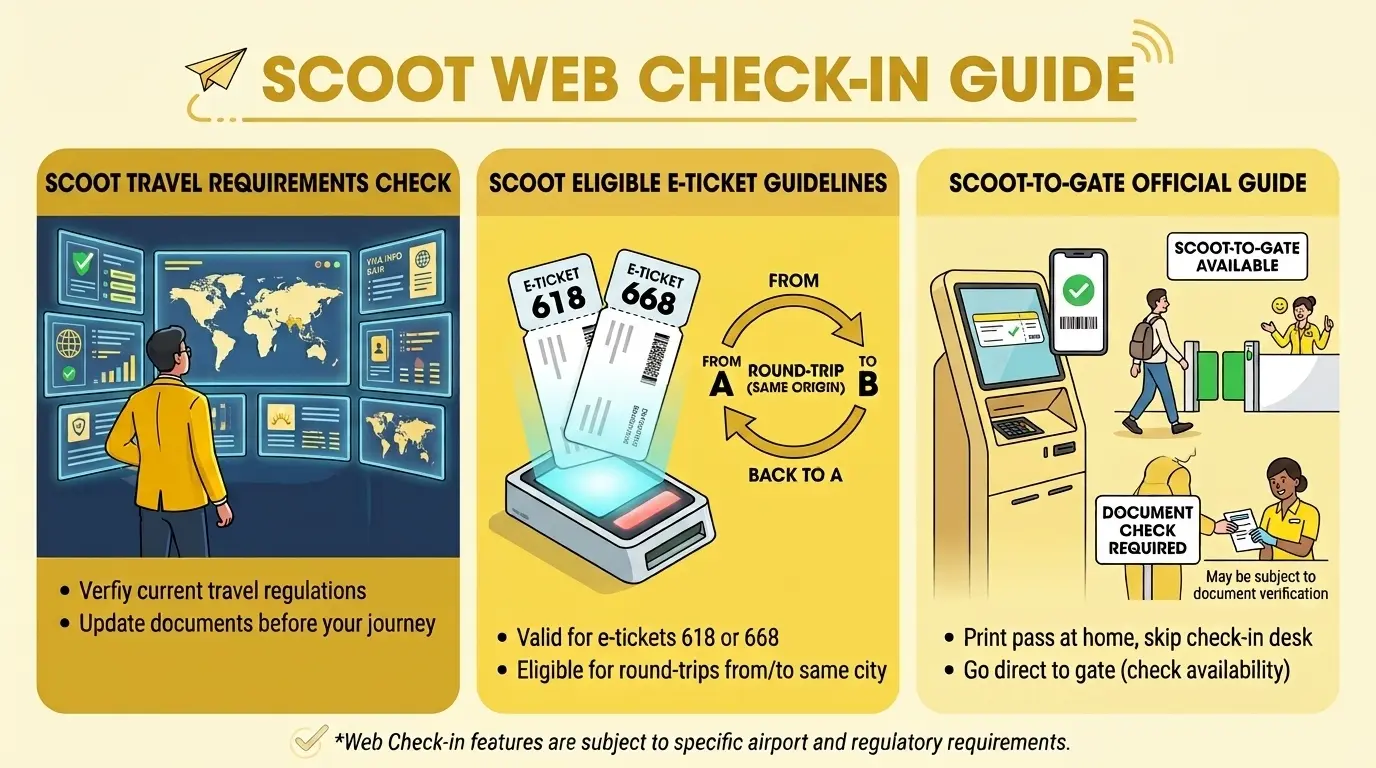
- Scoot-to-Gate service - If your check in has been done via online, you carry no checked baggage, and need no document checks, you can use a home-printed or digital pass to go straight to the gate
What to do if you can’t download your boarding pass
- Check whether online check-in has been completed.
- Verify whether the route supports digital boarding passes.
- Check the Scoot app or website for updates.
- Visit the airport check-in counter for assistance or document verification.
How to reprint or retrieve a lost boarding pass
To reprint or retrieve a lost Scoot boarding pass, you can do it digitally or physically (at the airport) depending on your location.
Digital and mobile boarding passes
- Check the email address you used during booking for your original flight confirmation, e-ticket, or digital boarding pass.
- If you checked in through the Scoot Mobile App, log into your account or open your Apple Wallet/Google Wallet where digital or saved mobile boarding passes are stored.
- Log back into the Scoot Web Check-in Portal using your booking reference (PNR) and passenger last name to view or download your pass again.
At the Airport
- Self-Service Kiosks - If you are departing from Singapore Changi Airport (Terminal 1) or other supported airports, you can reprint your boarding pass at the self-service check-in kiosks.
- Scoot Check-in Counter/Customer Service Desk - Approach the Scoot ground staff or ticket counter at the airport. Provide them with your passport and booking reference number. An an agent can print a physical copy for you in minutes.
What does Scoot-to-Gate mean and how does it work?
Scoot-to-Gate is a paper-free, self-service that allows eligible Scoot Airlines passengers to skip physical airport check-in counters and head directly to departure immigration to their boarding gate.
- Complete online check-in - Visit the Scoot check-in portal between 48 hours and 1.5 hours before scheduled departure.
- Check your Scoot-to-Gate eligibility - Check whether your boarding pass confirms eligibility for Scoot-to-Gate.
- Proceed to departure immigration - Head towards departure immigration, keep your boarding pass, passport and any other required travel documents ready.
- Go to your boarding gate - After completing the airport formalities, proceed to your assigned gate.
Please note that Scoot-to-Gate service is applicable if you meet the following criteria -
- You have successfully checked-in online.
- You carry no checked baggage.
- No document check requirement..
Scoot Airlines Baggage Drop-Off After Online Check-In
Passengers need to drop off checked baggage after they have successfully completed web check-in via Scoot’s check-in portal. Head to the airport check-in or automated bad drop counter at least 120 minutes ahead of your scheduled flight departure.
Step-by-step baggage drop process
- Complete your check-in via the Scoot mobile app or website.
- If using an Automated Bag Drop at supported airports (Singapore, Bangkok, Melbourne), stop by a self-service kiosk first to print your boarding pass and baggage tag(s).
- Attach the main tag to your bag's handle with the barcode facing out, and place the small backup sticker on your bag.
- Head to the designated Automated Bag Drop machine or Scoot counter. Keep passport, travel documents, and boarding pass ready for verification.
- Ensure your individual checked bag weighs no more than 32kg due to occupational safety rules.
Final Statements
Scoot web check-in allows passengers to skip long airport queues, save time and use digital or a home-printed boarding pass. In addition, following Scoot’s protocols governing web check-in and checked baggage inspection is also crucial. Web check-in is one of the most effective time management techniques reducing pre-flight stress, allowing travelers to review baggage-related restrictions, confirm passenger details ahead of time and arrive at the airport closer to boarding.
For passengers, it is necessary to verify boarding pass eligibility, baggage deadlines and gate closing times to ensure a smooth journey. Seek the assistance directly from Scoot’s official website query regarding flight and airport.
Frequently Asked Questions(FAQ's)
Ans: It closes exactly 1.5 hours (90 minutes) before your scheduled flight departure.
Ans: Yes. The online check-in window is open from 48 hours down to 1.5 hours before departure.
Ans: Yes. You can download a digital or mobile boarding pass on your phone through the Scoot Mobile App, provided your departure city supports it and you do not require extra document checks.
Ans: Not always, but it depends on your route. If your departure airport supports mobile boarding passes, your phone is enough.
Ans: Scoot strongly recommends arriving at least 120 minutes (2 hours) before departure to complete security and check-in procedures.