- 08 Oct, 2026
Singapore Airlines web check-in is the digital process that helps you get confirmation of your flight details and boarding pass through the airline’s website. This way you secure your seat in the Singapore Airlines and download a digital boarding pass before you go to the airport. In addition, the recipient of Skytrax World Airline Awards 2026 for “Best Airline in Asia”, Singapore Airlines is a name globally distinguished as a flag carrier of Singapore with its hub located at Changi Airport.
Key takeaways
- Web and mobile check-in opens 48 hours before departure and closes 1.5 hours before (2 hours if you use an e-ticket number).
- Web check-in does not replace baggage drop. If you have checked bags, you still need to visit the bag-drop counter or kiosk.
- A digital boarding pass is not guaranteed. It depends on your departure airport and regulations.
- Online check-in does not replace visa, passport or immigration requirements.
What does Singapore Airlines web check-in offer?
Singapore Airlines web check-in offers the convenience of completing check-in before you reach the airport. This digital process helps you save time at the airport. It stands for a great deal of comfort for those passengers who have already selected their seats and are traveling with cabin baggage only.
Please note that web check-in is not an alternative for skipping the airport counter. Passengers with checked baggage may still need to use a baggage-drop facility, and also for the passengers whose documents require verification or need an airport-issued boarding pass.
The blog is giving a detailed guide to Singapore Airlines web check-in timings, eligibility, the online process, boarding passes, baggage and other crucial information to help passengers understand the protocols to follow.
What Is Singapore Airlines Web Check-in? What can you do with it?
Singapore Airlines web check-in is the digital process of allowing eligible passengers to check in for their flight through the airline’s website. Passengers can also use mobile check-in provided by the airline’s SingaporeAir app.
In the web check-in, what is allowed for passengers to do based on their departure airport and circumstances include confirming the flight check-in, selecting or changing seat, and obtaining a digital boarding pass where available. Besides, it helps them avoid regular check-in counters (if traveling without checked baggage and do not require document verification), and proceed to baggage drop (if they need to check in luggage).
According to Singapore Airlines, the web/mobile check-in is generally open 48 hours before departure and closes 1.5 hours before the departure.
Singapore Airlines web check-in timings
Singapore Airlines maintains a time-bound schedule for web check-in. Thus, passengers are advised to follow the check-in timings accordingly.
|
Check-in option |
Opening time |
Closing time |
|
Website/mobile check-in |
48 hours before departure. |
1.5 hours before departure. |
|
Auto check-in |
Automatically, 48 hours before departure. |
— |
|
Airport check-in |
Varies by airport. |
Usually at least 40–50 minutes before departure, but requires verification. |
Singapore Airlines web check-in: Eligibility
Who are eligible passengers for Singapore Airlines web check-in? In fact, eligibility plays a crucial role here because the airline needs to verify safety requirements, special assistance needs, and travel documents legally before issuing a digital boarding pass. In this brief guide, we are highlighting some key web check-in eligibility concerning Singapore Airlines.
These passengers are not eligible for Singapore Airlines web check-in:
- Passengers below the age of 18, and not accompanied by an adult (18+) passenger.
- Passengers having one or more preceding flights in the same booking for which they have not checked in. In other words, you can’t check in online for your current flight if an earlier flight on the same ticket or booking reference has not been checked in yet.
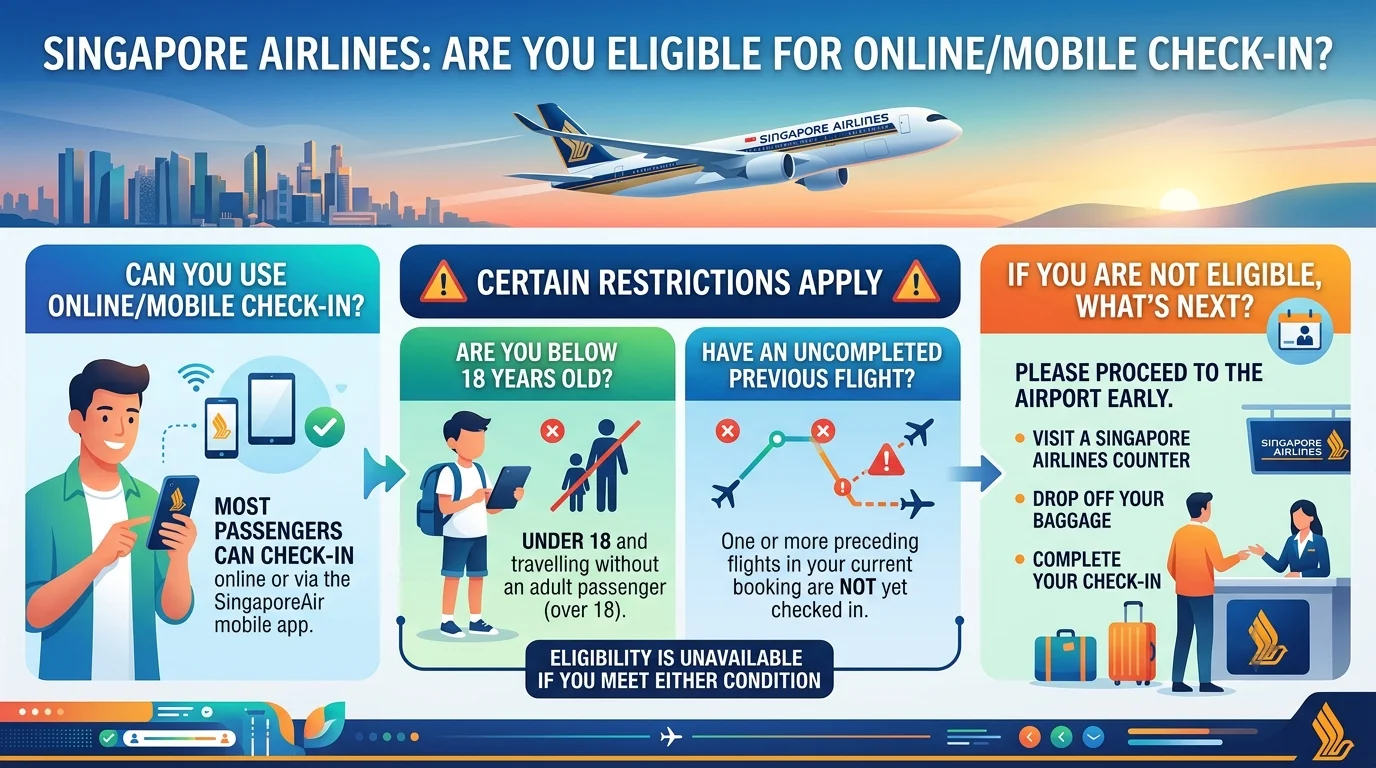
According to Singapore Airlines, if you fail to meet the required above eligibility, you need to proceed to the airline’s airport counter early to check in and drop off your baggage. Please note that this eligibility is also mandatory for Singapore Airlines mobile check-in.
Important points to follow -
- Boarding deadline - Please be advised that the said 1.5 hour online check-in by Singapore Airlines should not be confused with the airport check-in or boarding cut-off. This is because airport procedures can have different deadlines, depending on the departure location and flight.
- Airport arrival time - Passengers departing from Singapore Changi Airport are advised to arrive nearly 3 hours before the scheduled departure, particularly when checking baggage. The airport check-in counters at Changi usually close 40 minutes ahead of the departure, though specific flights can have different arrangements.
- Boarding pass time for U.S. flights - Timings for a different boarding pass is also a likelihood for flights to the United States. According to Singapore Airlines’ auto check-in information, boarding passes for the U.S. flights remain available 24 hours to 1.5 hours ahead of departure. This means travelers should check the boarding pass availability as per their particular itinerary. Do not assume that every flight follows exactly the same process.
How to do Singapore Airlines Web Check-In - Step by Step Guide
The web check-in digital process of Singapore Airlines is meant to simplify traveling of passengers. The airline spares no pains in maintaining absolute convenience for the passengers when handling online check-in. Here’s a step by step guide regarding Singapore Airlines Web Check-In.
Go to the official check-in page of Singapore Airlines
Since this is a web check-in digital process, obviously, you need to visit the official check-in page of Singapore Airlines. Alternatively, you can do so using the airline’s official mobile app.
Enter your booking details
You need to enter your 6-character PNR or booking reference or e-ticket number, along with your surname or last name. Please note that the airline allows you to retrieve your booking using either SQ booking reference + family/last name, or 13-digit e-ticket number + family/last name.
According to Singapore Airlines, passengers can use their booking reference to check in one or more passengers from 48 hours to 1.5 hours ahead of departure. Also, an e-ticket number can be used for one passenger from 48 hours to 2 hours before departure.
Select the flight and passenger
After following the second steps, which involves retrieving the booking, now select the passenger or passengers you want to travel with and follow the instructions shown on the screen.
For passengers having multiple flights, they must be checked-in for each one. In other words, make sure you have boarding passes and confirmed check-ins for all flight segments of your travel to avoid getting stuck at the gate in the airport terminal.
Review or select your seat
Select or change your seat, depending on your booking and fare conditions. Passengers, who have not pre-selected their seats, can choose them during online check-in without an additional charge. However, it depends on seat availability and applicable conditions, like emergency exit row criteria or paid zones like extra legroom seats that attract fees.
Complete required information
This is a very important information you need to keep in mind. Check and review every detail you have furnished so far, like passenger and travel information. For passengers traveling internationally, additional documentation or verification may be required depending on the route. It is so because online check-in is not the substitute for immigration, visa or other mandatory travel document requirements.
Complete check-in
After completing the check-in process, you will receive a check-in confirmation email.
Get your boarding pass
Download or access your boarding pass depending on whether your departure location supports digital or mobile boarding passes, plus you comply with the applicable requirements. In case the digital boarding pass is not issued, you still have a chance to do online check-in and get a boarding pass at the airport.
How to get a Singapore Airlines boarding pass after web check-in
The said boarding pass can be obtained through the airline’s official channels or through airport self-service kiosks where you need to visit physically. Currently, Singapore Airlines offers various forms of boarding passes, such as -
- Digital boarding pass in PDF format
- Mobile boarding pass through the official app
- Printed boarding pass that you get at the airport counter
- Kiosk-printed boarding pass at an airport check-in kiosk, where available.
To elaborate them clearly, the digital boarding pass in PDF format is generated during web check-in, where you can save it on your device or have it printed. You can access a mobile boarding pass directly through Singapore Airlines’ mobile app, and can obtain a counter-printed boarding pass from airline staff at the airport check-in counter.
Whether you get a digital or mobile boarding pass largely depends on the departure location and applicable regulatory requirements.
What if you don’t get a digital boarding pass from Singapore Airlines?
Completing web check-in and receiving a digital boarding pass are not the same thing. Hence, if Singapore Airlines does not allow you to generate or download a digital boarding pass, get it from the airport check-in counter.
Moreover, the airline also advises passengers to check in online, regardless of whether they face problems in generating a boarding pass digitally. That’s because web check-in still allows them to use airport kiosks or dedicated counters where available, plus also useful if you have not selected a seat. For more information regarding Singapore Airlines check-in, visit the FAQ section of the airline
What to do in case you have checked baggage only?
As far as checked baggage is concerned, you need to hand it over to the airport agent or automated drop system for inspection, even though you do a web check-in. To say otherwise, if you have done the online check-in and have luggage to check, go to the designated baggage-drop facility or the airport counter to have it inspected.
At selected airports, the airline provides self-service kiosks and automated bag-drop facilities. For instance, Singapore Changi Airport allows passengers to print baggage tags at kiosks and use automated bag drops where available. Passengers traveling with cabin baggage only, have a valid digital boarding pass, and do not require document verification, can proceed directly toward departure immigration/security.
How early should you reach the airport once the web check-in is done?
Just because you have done a web check-in doesn’t mean that you need to arrive at the airport right before the flight departure. There is still so much time to handle other essentials like checked-baggage drop, security screening, immigration, travel-document verification, airport transit, and walking to the boarding gate.
Why you still need time at the airport
- It is mandatory for passengers to visit the airline’s bag-drop counter if they are checking bags. The counter closes 45 to 60 minutes before departure.
- You need time at the airport because long lines at security checkpoints take significant time depending on the airport and passenger volume.
- International flights require passport control, visa verification, and exit immigration. Handling them takes time.
- Boarding gates usually close strictly 15 to 25 minutes before the flight leaves, making it essential for passengers to reach the gate long before the actual departure time.
Singapore Airlines Web Check-in vs Airport Check-in
The below table details a comparative analysis between web check-in and airport check-in in the context of Singapore Airlines. These details are essential to help you understand what each check-in matters for a passenger.
|
Feature |
Web/Mobile Check-in |
Airport Check-in |
|
Where? |
Singapore Airlines website/app. |
Airport counter or kiosk. |
|
Standard opening |
48 hours before departure. |
Varies by airport. |
|
Standard online closing |
1.5 hours before departure. |
Varies by airport. |
|
Seat management |
Available subject to conditions. |
Available subject to conditions. |
|
Digital boarding pass |
Available at selected locations. |
Can be issued where required. |
|
Checked baggage |
Requires baggage drop. |
Can be handed over at counter/bag drop. |
|
Document verification |
May still be required at the airport. |
Can be completed at the airport. |
|
Best for |
Saving time before reaching the airport. |
Baggage, document checks and assistance. |
Singapore Airlines web check-in - Quick reminders
Though this blog entirely focuses on Singapore Airlines web check-in, you need to keep these important points in mind.
- Online check-in usually opens 48 hours before flight departure.
- The timing of 1.5 hours before the scheduled departure indicates the standard online/mobile check-in window.
- Check-in associated with an e-ticket number has a different deadline of two hours before departure.
- Digital boarding passes are available only at supported locations and for eligible passengers.
- Online check-in does not rule out baggage-drop requirements.
- In-person visit to an airport counter is required for some passengers for document verification or other assistance.
- Codeshare flights may require check-in with the operating airline.
- The boarding gate closes 15 minutes before departure.
- Flights for the U.S. can have different boarding-pass availability rules.
- Checking in online does not replace visa, passport or other entry requirements.
Common Singapore Airlines web check-in problems and how to fix them
In certain cases, passengers may come across Singapore Airlines online check-in problems. These problems may point to window timings, booking reference, visa checks, etc. Here’s the list of these problems.
- Check-in not open yet - In that case, wait until the 48 hours window opens or try using auto-check-in.
- PNR not found or restricted - This problem may occur due to typo in the 6-character booking reference or your last name. Therefore, double-check your spelling against your e-ticket email. If the problem is due to fare rules, check in at the airport counter.
- Forced seat payment loop - This is a system-related problem asking you to pay for preferred, extra-legroom, or window/aisle choices. To fix it, select any standard, uncharged seat option to bypass the fee and finish the check-in for free.
- Mandatory document or visa checks - If the online check-in is not successfully complete due to destinations that mandate manual visa or health verification, take your passport and physical documents straight to the airport check-in desk to fix it.
- Technical glitch - Problems related to high traffic slowing down the web page or browser cache issues, fix them by clearing your browser cache. Switch to incognito mode, or use the official mobile app.
Final Words
Singapore Airlines is one of the best airlines in the world for its unique blend of Asian hospitality and world-class services, plus being the recipient of Asia’s Best Airline at the Skytrax World Airline Awards.
Featured in the blog is Singapore Airlines web check-in guide intended to give you a profound update on how the airline’s online check-in functions, rules to follow, and how compliance with them is essential for your journey.
Also to be kept in mind is the fact that Singapore Airlines web check-in is mainly a time-saving option for passengers, but not a replacement for every airport procedure. You should remember the timing regarding opening and closing of the check-in window.
After completing the check-in, passengers may access a digital or mobile boarding pass. If you are traveling with checked baggage, you need to proceed to the appropriate baggage-drop facility. Once the web check-in is done, verify that your boarding pass has been issued. Check baggage and document requirements.